
PromptBuilder review 2026: is this $39 Dealify lifetime deal worth it for AI users?
Disclosure: Some links in this article are affiliate links, which means I may earn a commission if you decide to make a purchase—at no additional cost to you. This helps support my work and allows me to continue creating helpful content. I only recommend tools that I have researched and believe are genuinely useful.
Here's a problem I've had with AI tools for a long time — and I suspect you have too.
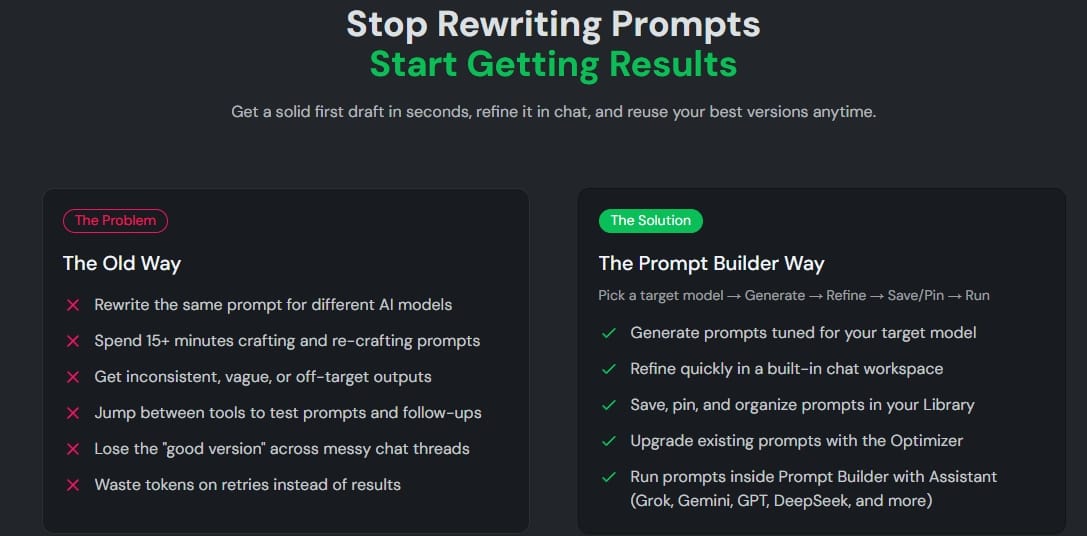
You open ChatGPT. You type something. The output is mediocre. So you rewrite the prompt. Then rewrite it again. Then switch to Claude because maybe it does this better. Write the prompt again from scratch.
Twenty minutes later you have something usable, but you've forgotten what prompt actually worked — because it's buried in a chat thread you'll never find again.
This is not a ChatGPT problem or a Claude problem. It's a prompt management problem. And finding a genuine Dealify lifetime deal worth it that actually solves this specific issue is harder than it sounds.
PromptBuilder is designed to fix exactly this. Let me walk you through what it actually does, who it's built for, and whether the $39 Dealify deal makes sense for your workflow.
What is PromptBuilder? The AI prompt IDE explained
Learn more About
PromptBuilder is an AI prompt engineering platform — think of it as an IDE (integrated development environment) for prompts. Where a code editor helps developers write, test, and organize code, PromptBuilder helps you generate, optimize, test, and organize AI prompts.
It's a web app for turning plain-English tasks into structured prompts for AI models — supporting GPT, Claude, Gemini, Llama, Mistral, and others — allowing you to refine, test, and compare prompts while saving versions, templates, and libraries for reuse.
The core idea is that your best prompts should be assets you can save, refine, and reuse — not disposable messages that disappear inside endless chat threads.
Start with a rough idea — "draft a product FAQ" or "convert notes into a LinkedIn post" — and the tool structures an optimized prompt in under 15 seconds.
It positions itself as an alternative to the trial-and-error approach most people currently use with AI tools. If you use AI daily for writing, marketing, research, coding, or content creation — and you're still rewriting the same prompts repeatedly — this is the problem PromptBuilder is built to solve.
PromptBuilder features: what you actually get in 2026
1.Prompt Generator — 1,000+ templates
The starting point for most users. You describe what you need in plain English, choose your target AI model, and PromptBuilder generates a structured, model-aware prompt in seconds.
The 1,000+ template library covers marketing, content creation, coding, customer support, SEO, product development, and more. This means you're never staring at a blank box trying to figure out how to phrase a request.
The key difference from just using ChatGPT directly: the prompt is built specifically for the model you're targeting. A prompt optimized for Claude's reasoning style looks different from one built for GPT's structured output preferences — and PromptBuilder handles that adaptation automatically.
2.Prompt Optimizer — upgrade any existing prompt
Already have prompts that kind of work but could be better? Paste them into the Optimizer and it upgrades them instantly by adding clearer instructions, better constraints, structured output formatting, and relevant examples.
Every version is automatically saved, so you can compare what the prompt looked like before and after optimization. Over time this builds a history of how your prompts have improved — which is genuinely useful if you're using AI regularly for specific recurring tasks.
3.Prompt Assistant — run and test without leaving the platform
Instead of generating a prompt in PromptBuilder and then copying it into ChatGPT or Claude to test it, you can run it directly inside the built-in Prompt Assistant workspace.
Supported models include GPT, Claude, Gemini, DeepSeek, and Grok. You test, refine in chat, and save the best output — all without switching tabs.
4.Prompt Library — your personal prompt knowledge base
Every prompt you generate, optimize, or save goes into your Prompt Library. You can tag prompts by category, pin your most-used ones, search and filter by model, and reuse them across projects.
The ability to save templates allows for rapid automation of complex tasks, turning AI into a measurable, repeatable science and dramatically streamlining the workflow.
This is the feature most people undervalue at first and love most after 30 days. Your best prompts become a library of reusable assets — not something you have to reconstruct from memory every time.
5.SMM Bot — social media content generator
A dedicated system for generating social media content. You can create platform-ready posts for X, LinkedIn, Instagram, TikTok, and Reddit — with platform-specific formatting, hooks, hashtags, CTA options, and tone presets built in.
For content marketers and bloggers already using AI for social content, this adds a structured, prompt-driven approach to what's usually an ad hoc process.
Who is PromptBuilder best for? Use cases and ideal users in 2026
Bloggers and content creators — if you use AI daily for writing and find yourself rewriting the same prompts repeatedly, the prompt library and optimizer alone justify the $39 entry price. Build your best prompts once, save them, reuse them forever.
Marketing and content teams — the ability to standardize prompts across a team is where PromptBuilder becomes genuinely valuable at scale. Everyone works from the same library of proven, model-optimized prompts rather than each person reinventing their own approach.
Freelancers and solo founders — the SMM Bot and prompt generator together create a fast, repeatable content production workflow. Less time prompting means more time building.
Developers — model-aware prompt generation for code reviews, debugging, refactoring, and technical documentation. The ability to save and version prompt templates for recurring development tasks is particularly useful.
Support teams — build a reusable library of customer reply prompts, knowledge base content prompts, and documentation templates that produce consistent outputs without manual prompt-writing each time.
Pros and Cons
Solves a real, daily problem — prompt rewriting and prompt loss are genuine workflow drags
1,000+ templates remove the blank-box problem immediately
Model-aware prompts — different structure for GPT, Claude, Gemini, Llama, DeepSeek, and others
Built-in optimizer upgrades any existing prompt instantly
Run and test prompts in built-in assistant — no tab switching
Prompt Library with tagging, search, and pinning turns prompts into reusable assets
SMM Bot for social media content is a practical bonus
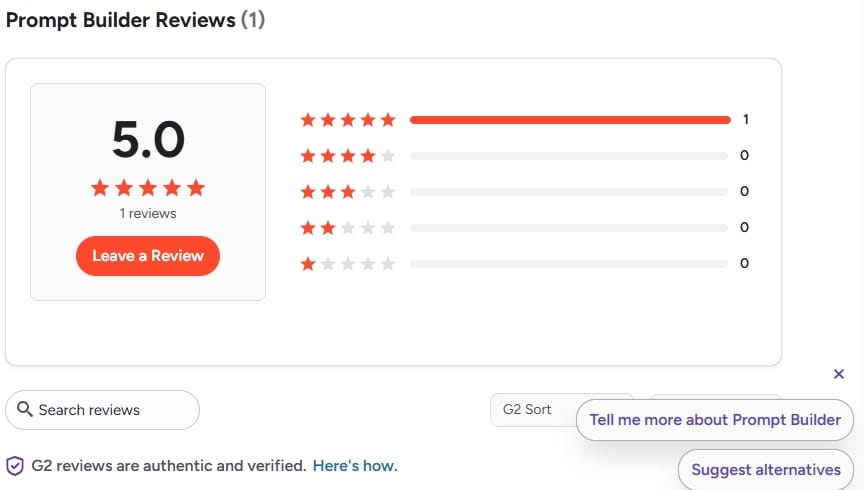
Rated 5.0 stars on G2 from verified users
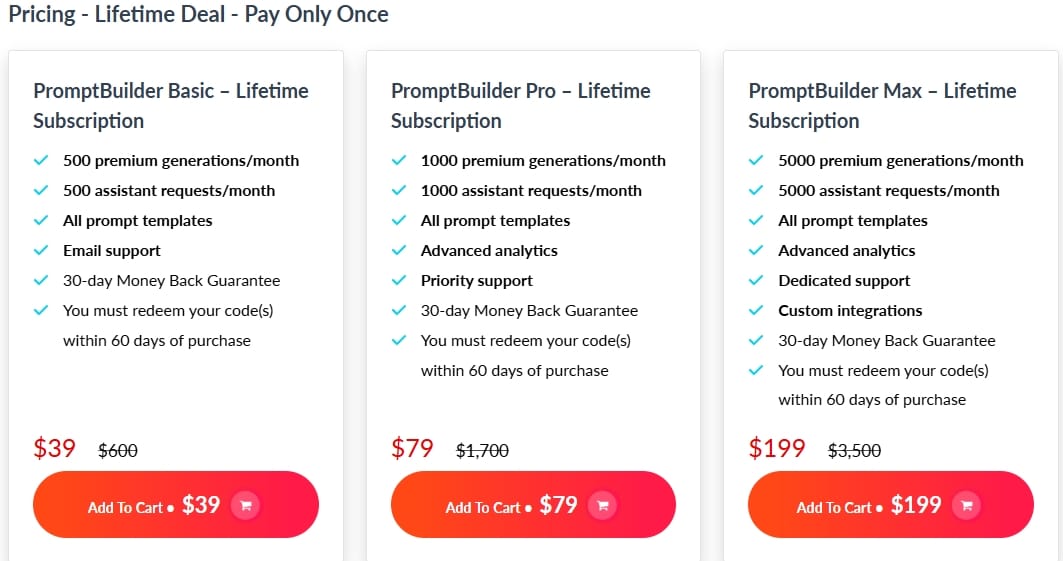
Basic plan at $39 lifetime on Dealify — 94% off regular price
30-day money-back guarantee — zero financial risk to test it
Cons
Very new product — limited Trustpilot and community review presence makes it harder to gauge long-term reliability
Monthly generation limits — Basic plan's 500 generations may feel restrictive for heavy daily users
Team collaboration is on the roadmap but not yet live — teams currently share prompts manually
No mobile app mentioned — primarily desktop/laptop access
The prompt assistant runs inside the platform, not natively inside your existing ChatGPT or Claude interface — requires a workflow adjustment
Advanced users who prefer scripting prompts manually may find the structured approach limiting
Beginner tips: how to start with PromptBuilder without getting overwhelmed
Start with one use case. Don't try to build a prompt library for everything on day one. Pick the single task you do most with AI — writing blog intros, drafting emails, generating social posts — and build 5 prompts for that task first.
Use the Optimizer on prompts you already have. Before building anything new, paste your 3 best existing prompts into the Optimizer. See what it suggests. This gives you immediate value without any setup time.
Tag your prompts from day one. The library becomes confusing fast if you don't tag from the start. Use simple, consistent tags: "blog," "social," "email," "coding," "SEO." Five minutes of organization now saves hours of searching later.
Test every prompt in the built-in assistant before saving. Don't save prompts you haven't tested. Run them through the Prompt Assistant first, see the actual output, refine if needed, then save the working version.
Build model-specific variants of your best prompts. If you use both ChatGPT and Claude, generate one version of your core prompts for each model. The outputs will be different and both worth keeping.
Common mistakes to avoid
Saving every prompt without testing. A library full of untested prompts is just digital clutter. Only save what you've confirmed works. Quality over quantity.
Ignoring the optimization history. The Optimizer saves every version automatically. Most users never look at the history — but comparing before and after shows you exactly what makes a prompt better, which makes you a better prompt writer over time.
Using the same prompt for every AI model. The whole point of model-aware generation is that GPT, Claude, and Gemini respond differently to different structures. If you're using one generic prompt across all three, you're leaving quality on the table.
Not using the SMM Bot for social content. Most people focus on the prompt generator and optimizer and completely miss the social media system. If you post on LinkedIn, X, or Instagram regularly, the SMM Bot is worth exploring in week one.
Trying to build the perfect library before using it. The prompt library gets better through use, not through planning. Start using it immediately with imperfect prompts and improve them over time.
Honest recommendation
PromptBuilder solves a real problem. If you use AI tools daily and still find yourself rewriting prompts, losing good prompts in chat threads, or getting inconsistent outputs, the core workflow here is genuinely useful.
It imposes a systematic structure on AI processes, forcing precise parameters — role, audience, format — so you get consistent and accurate output on the first try. That shift from ad hoc prompting to structured, reusable prompts is a meaningful change for anyone using AI seriously.
The honest caveat: it's a newer tool with limited community validation so far. The 30-day money-back guarantee from Dealify is your testing window — use it properly before the deadline, not as a last-minute safety net.
Whether you compare it to PromptBase, PromptPerfect, or simply your current approach of typing directly into ChatGPT — the prompt library, optimizer, and model-aware generation make PromptBuilder one of the most affordable AI prompt tools available as a lifetime deal right now.
The $39 Basic plan is the sensible starting point. The $79 Pro plan is worth it if you're generating AI content daily. The $199 Max plan only makes sense for agencies or teams producing prompts at genuine scale.
Final conclusion: should you buy PromptBuilder in 2026?
If AI tools are already part of your daily workflow — and prompt rewriting, inconsistent outputs, and lost good prompts are real frustrations you experience regularly — PromptBuilder is worth the $39.
It won't magically make your AI outputs perfect. What it does is give your prompting a system: generate, optimize, test, save, reuse. That system compounds over time as your library grows and your prompts get better.
Check the current pricing and plan details on Dealify. The 30-day money-back guarantee means you can test the full platform properly before committing — which is exactly how you should evaluate any Dealify lifetime deal.
Bonus tips: how to make the best use of PromptBuilder
Build a "starter pack" of your 10 most-used prompts in the first week. These become your foundation — the prompts you reach for every day. Once they're in the library and tested, your daily AI workflow gets noticeably faster.
Use the SMM Bot to repurpose blog content. Take your published blog post, feed the key points into the SMM Bot, and generate LinkedIn posts, Twitter/X threads, and Instagram captions in the same session. One article becomes a week of social content.
If you work with a team, share your best prompts manually using the export function until the collaboration feature ships. Even a shared Google Doc of your best prompts is better than everyone maintaining their own separate approach.
Run the same task prompt through three different models in the built-in assistant. Note which model produces the best output for that specific task. Over time this builds your own practical knowledge of which model to use for which job — without any trial-and-error in the moment.
Use prompt versioning for recurring tasks that change seasonally. If you write product descriptions or campaign content that follows seasonal themes, save separate prompt versions and switch between them rather than rebuilding from scratch each time.
Frequently asked questions
Is PromptBuilder worth it in 2026? For anyone using AI tools daily who struggles with prompt rewriting and inconsistent outputs, yes — the $39 Basic lifetime deal on Dealify is low-risk value. Use the 30-day money-back guarantee to test whether it fits your specific workflow before fully committing.
What AI models does PromptBuilder support? PromptBuilder generates model-aware prompts for ChatGPT, Claude (Opus and Sonnet), Gemini, DeepSeek, Perplexity, Cohere, Llama, Mistral, and Grok. Each prompt is structured to match the formatting preferences and strengths of the target model.
What is the difference between PromptBuilder Basic, Pro, and Max plans? Basic ($39) gives 500 generations and 500 assistant requests per month — enough for moderate individual use. Pro ($79) doubles that to 1,000 of each and adds advanced analytics and priority support. Max ($199) provides 5,000 of each with dedicated support and custom integrations — built for agencies and teams at scale.
Does PromptBuilder support team collaboration? Team collaboration is on the product roadmap but not yet live. For now, teams share prompts manually. If collaboration is a priority, check the current roadmap before purchasing.
How is PromptBuilder different from just using ChatGPT directly? ChatGPT starts blank every session — you rebuild prompts from memory or history. PromptBuilder gives you a structured library, model-specific optimization, version tracking, and a reusable template system. Your prompts become permanent assets rather than disposable messages.
Is the PromptBuilder Dealify lifetime deal legitimate? Yes. Dealify offers a 30-day money-back guarantee on all deals. The founder, Nikolay Gorb, is publicly named and the product has a live roadmap. G2 shows a verified 5.0 rating from early users.
PromptBuilder review 2026: is this $39 Dealify lifetime deal worth it for AI users?
Large Call to Action Headline

Hello, I'm Farzana Atika. I write simple and honest reviews of SaaS tools, productivity apps, and business software to help
you discover the best tools to build and grow online.