Paperbot AI review 2026: is this $79 Dealify lifetime deal worth it for students and bloggers?
Disclosure: Some links in this article are affiliate links, which means I may earn a commission if you decide to make a purchase—at no additional cost to you. This helps support my work and allows me to continue creating helpful content. I only recommend tools that I have researched and believe are genuinely useful.
Let me start with a problem I know you've felt before.
Someone shares a 90-minute YouTube video. "Watch this — it's really good." You open it. You watch 10 minutes. You skip forward. You watch 5 more minutes. You lose the thread. You give up.
Or you're a blogger who wants to write about a trending topic but the best source material is a 45-minute webinar you don't have time to sit through. Or you're a student with 6 lecture recordings to review before an exam.
The content is valuable. The time required to consume it is not something you have.
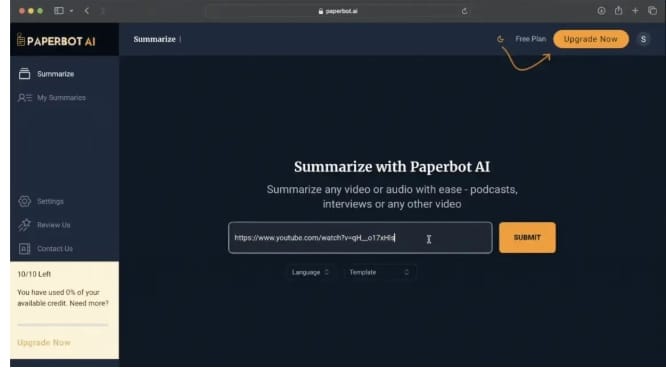
This is exactly the problem Paperbot AI is built to solve. It turns YouTube videos into readable blog summaries — fast. You paste a link, and instead of watching the video, you read a structured summary of its key insights.
Finding a Dealify lifetime deal worth it that solves a specific, everyday problem is rare. Let me walk you through what Paperbot AI actually delivers — and where it has real limitations worth knowing before you buy.
What is Paperbot AI? The YouTube video to blog summarizer explained
Paperbot AI is an AI-powered video summarization tool. Its core job is simple and specific: take a YouTube video URL, analyze the audio content, and generate a concise, readable blog-style summary of the key insights — in seconds.
Paperbot AI turns long videos into short, easy-to-read blogs. It saves you time and money by extracting the valuable information from any webinar, seminar, or presentation without the extensive time commitment.
Unlike general AI writing tools that work with text you provide, Paperbot AI processes video directly. It can summarize videos even without existing transcripts by analyzing the audio content itself — which is one of its more technically useful capabilities.
The current platform focuses on YouTube videos, with Udemy, Vimeo, and Coursera support listed as coming soon. A Chrome extension is also on the roadmap but not yet available at the time of this review.
The key difference from free alternatives like Eightify or NoteGPT: Paperbot AI generates a full blog-style article from the video, not just bullet-point timestamps. The output is structured, readable content you can actually use or publish — not just a quick reference summary
Paperbot AI features: what you actually get in 2026
YouTube video to blog conversion
The headline feature. Paste any YouTube URL — a webinar, tutorial, lecture, seminar, podcast video, or presentation — and Paperbot AI processes the audio, identifies the key insights, and generates a structured blog article from the content.
The output is designed to be readable and usable, not just a transcript reformatted with paragraph breaks. The AI organizes information into a logical structure with sections and key points that reflect the video's actual content flow.
Works without video transcripts
Many free YouTube summarizers rely on existing auto-generated captions. Paperbot AI analyzes audio directly, which means it can process videos that don't have transcripts — a meaningful advantage for webinars, live recordings, niche educational content, and older videos without auto-captions.
BYOK — Bring Your Own OpenAI Key
Paperbot AI supports BYOK (Bring Your Own Key) integration with OpenAI. This means you can connect your own OpenAI API key to control costs and processing quality at the model level. For power users who already have an OpenAI account, this adds flexibility that most consumer-facing tools don't offer.
Unlimited YouTube summarization
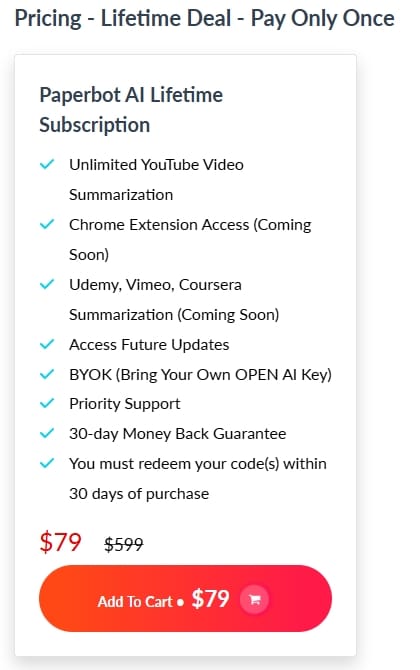
The lifetime plan includes unlimited YouTube video summarizations — no monthly caps, no credit limits for the core summarization function. For students processing large volumes of lecture content, or researchers working through extensive video libraries, this is the feature that makes the lifetime deal financially compelling.
Future platform expansion
Udemy, Vimeo, and Coursera summarization are listed as coming features. A Chrome extension is also on the roadmap. These are not yet available — which is important to factor into your buying decision if these platforms are your primary use case.
Who is Paperbot AI best for? Use cases and ideal users in 2026
Students and academics — the most natural fit. If you have lecture recordings, tutorial videos, or online course content to process, Paperbot AI converts hours of video into readable study notes in minutes. The unlimited summarization on the lifetime plan makes it particularly valuable for high-volume academic use.
Bloggers and content marketers — if you regularly write about topics where the best source material is video content (industry webinars, expert interviews, conference talks), Paperbot AI lets you extract key insights and incorporate them into your writing without watching hours of footage.
Researchers and professionals — staying current in any field increasingly means consuming video content from conferences, seminars, and expert talks. Paperbot AI converts that video research into scannable text you can process much faster.
YouTubers and video creators — convert your own long-form video content into blog posts automatically. This is a genuine content repurposing use case — one video becomes both the YouTube content and the accompanying blog article.
Busy professionals — anyone who regularly receives webinar recordings, training videos, or conference presentations and needs to extract the key points without the time investment of watching everything.
Pros and Cons
Solves a genuinely common and frustrating problem — video content taking too long to consume
Works without existing transcripts — analyzes audio directly
Unlimited YouTube summarization on lifetime plan — no caps
BYOK OpenAI integration for power users
Extremely simple workflow — paste URL, get blog summary
Future platform support (Udemy, Vimeo, Coursera) and Chrome extension on roadmap
$79 lifetime deal at 87% off — strong value if the core feature works for your use case
Priority support included
Cons
Currently YouTube only — if your primary need is Udemy or Vimeo, those features are not yet live. Buying based on coming-soon features carries risk.
At least one verified buyer reported significant issues with the tool not working after multiple attempts — important to test immediately within your refund window Dealify
The refund policy is store credit, not cash — different from Dealify's standard money-back guarantee wording on other tools
Chrome Extension not yet available — browser integration is listed as coming soon
No independent Trustpilot or G2 review base yet — limited community validation
The blog output quality will vary significantly based on video audio quality and clarity
Very early stage product — roadmap features may take time to arrive
Beginner tips: how to start with Paperbot AI without getting disappointed
Test it on your best-case content first. Start with a clear, well-produced YouTube video with good audio quality — a professional webinar, a TED talk, or a high-quality tutorial. This gives you the most accurate picture of what the tool can produce. Don't start with a noisy, low-quality video and judge the tool on that result.
Test it immediately after purchase. Because the refund window is 30 days and the policy is store credit rather than cash, you want to evaluate it as soon as possible. Don't buy it and try it in week three.
Use it for research, not publication. The blog output is a strong starting point — not a finished article. Read the summary, identify the key points, then write your own version using those insights. This gives you the efficiency gain without the risk of publishing AI-generated content that may have inaccuracies.
Try different video lengths. Short videos (5–15 minutes) will produce tighter, more focused summaries. Long videos (60+ minutes) will produce more comprehensive but potentially less structured output. Testing both helps you understand where Paperbot AI adds most value for your specific workflow.
Use BYOK if you have an OpenAI account. Connecting your own OpenAI API key gives you more control over the model used for summarization and can improve output quality for technical or specialized content.
Common mistakes to avoid
Buying primarily for coming-soon features. If Udemy summarization or the Chrome extension is the reason you want this tool — wait until those features are confirmed live before purchasing. Roadmap features are promises, not guarantees.
Treating the output as a finished article. Paperbot AI generates a summary that captures the video's key ideas. It is not a polished, publication-ready blog post. Always read, verify, and rewrite before using the output professionally.
Testing with low-quality audio. If you paste a video with background noise, heavy accents the AI struggles with, or poor recording quality, the summary will reflect those limitations. The tool is only as good as the audio it processes.
Not checking for accuracy. Like all AI summarization tools, Paperbot AI can occasionally miss nuance or slightly misrepresent a speaker's point. For anything important — research, academic work, professional decisions — verify key claims against the original video.
Ignoring the 30-day redemption window. Unlike most Dealify tools with 60-day redemption windows, Paperbot AI requires code redemption within 30 days of purchase. Don't buy it and forget about it.
Honest recommendation
Paperbot AI is solving the right problem. Video content consumption is one of the biggest time drains for students, researchers, bloggers, and professionals in 2026 — and the gap between "valuable video content" and "time available to watch it" is only growing.
The core feature works: paste a YouTube URL, get a readable blog summary. For students managing large volumes of lecture content and bloggers who want to extract insights from video sources quickly, this is genuinely useful.
The honest concerns are real too. At least one buyer has reported the tool not working at all after multiple attempts Dealify — which suggests the platform may have reliability issues for some users or video types.
The refund policy being store credit rather than cash is a meaningful difference from standard expectations. And the most exciting features — Udemy support, Vimeo, Chrome extension — are not yet available.
My recommendation: if YouTube summarization is your primary need and you test it immediately within the 30-day window, the $79 lifetime deal is reasonable value. If you're buying primarily for the coming-soon features, wait until they're confirmed live before purchasing.
Whether you compare it to free tools like Eightify or NoteGPT (which handle YouTube well but produce bullet points rather than blog articles), Paperbot AI's blog-format output is the genuine differentiator — and for bloggers specifically, that distinction matters.
Final conclusion: should you buy Paperbot AI in 2026?
Large Call to Action Headline
If you regularly spend time watching YouTube videos for research, learning, or content creation — and you want to convert that video time into readable, usable text much faster — Paperbot AI is worth testing.
The $79 lifetime deal represents strong value if the core function works reliably for your content. The 30-day window gives you enough time to test it properly with your actual videos before committing fully.
Check the current deal on Dealify. Remember the 30-day code redemption deadline and test it on your first day — not your last.
Bonus tips: how to make the best use of Paperbot AI
Use it to build a content research library. When you find a valuable YouTube channel in your niche, run several of their best videos through Paperbot AI and save the summaries. Over time you build a searchable knowledge base of expert insights you can reference when writing.
Combine it with Reporposely for a complete content pipeline. Use Paperbot AI to extract insights from a YouTube video and create a blog post. Then use Reporposely to repurpose that blog post into LinkedIn, Twitter, and Instagram content. One video becomes a full week of multi-platform content.
Use it for competitive research. Find YouTube videos from competitors or industry leaders, summarize them with Paperbot AI, and use the insights to understand what topics are resonating with your shared audience — without spending hours watching their content.
For bloggers, use it as an outline generator. The structured summary Paperbot AI produces makes an excellent article outline. Take the section headings and key points from the summary, then write your own version of each section with your perspective and additional research added.
Use it before important meetings or webinars. If you're attending a live event where pre-reading the speaker's previous talks would help — summarize their YouTube content beforehand with Paperbot AI and arrive better prepared than anyone else in the room.
Frequently asked questions
Is Paperbot AI worth it in 2026?
For students processing lecture content and bloggers who need to extract insights from YouTube videos quickly, yes — if the core YouTube summarization works for your content. Test it immediately within the 30-day window. Note the refund is store credit, not cash.
What videos can Paperbot AI summarize?
Currently YouTube videos only. Udemy, Vimeo, and Coursera support are listed as coming soon but are not yet available. The tool works on videos with or without existing transcripts.
How is Paperbot AI different from free tools like Eightify?
Free tools like Eightify produce timestamped bullet points — useful for quick reference. Paperbot AI generates a full blog-style article from the video content — more useful for bloggers, researchers, and anyone who wants a publishable or shareable written summary.
What is the BYOK feature?
BYOK means Bring Your Own Key — you can connect your own OpenAI API key to Paperbot AI for more control over the summarization model and quality. This is optional but useful for power users who already have OpenAI accounts.
Is the refund policy a full cash refund?
The Dealify listing for Paperbot AI specifies a "30-day Credit Back Guarantee" — meaning refunds are processed as Dealify store credit, not cash. This is different from a standard money-back guarantee and worth factoring into your decision.
How long does it take to summarize a video?
The platform processes videos in seconds to minutes depending on video length. For standard YouTube videos up to an hour, expect a summary in under 2 minutes.
Paperbot AI review 2026: is this $79 Dealify lifetime deal worth it for students and bloggers?
Large Call to Action Headline

Hello, I'm Farzana Atika. I write simple and honest reviews of SaaS tools, productivity apps, and business software to help
you discover the best tools to build and grow online.