MegaTranscript Review:All-in-one AI transcription and audio\/video processing platform
Disclosure: Some links in this article are affiliate links, which means I may earn a commission if you decide to make a purchase—at no additional cost to you. This helps support my work and allows me to continue creating helpful content. I only recommend tools that I have researched and believe are genuinely useful.
Accuracy and efficiency are crucial in the fast-paced digital world of today. Whether you work as a business professional, trainer, or content creator, handling audio and video content manually may be expensive and time-consuming.
Introducing MegaTranscript, an innovative tool that can automate text-to-speech conversion, transcription, and other tasks to improve workflow efficiency.
In This MegaTranscript Review let's examine the features and advantages of the MegaTranscript Lifetime Deal whether it is the best AI transcript tool or not.
What is MegaTranscript?
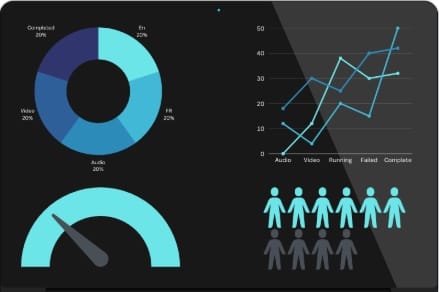
MegaTranscript is an all-in-one AI-powered transcription and audio/video processing platform designed to convert spoken content into accurate text, subtitles, translations, and natural-sounding voiceovers fast and
MegaTranscript automates the whole transcription process, in contrast to typical manual transcription services that are costly, time-consuming, and often inaccurate. It manages everything in a single cloud-based dashboard, including voice cloning, speaker diarization, vocal separation, multilingual subtitles, and meeting and podcast transcription.
Whether you work with interviews, meetings, videos, or internet content, MegaTranscript removes tedious manual labor and helps you publish content faster across multiple formats and languages.
Who Can be Benefitted from MegaTranscript?
MegaTranscript is built for individuals and businesses who frequently deal with audio or video information. It's most useful for:
YouTubers and podcasters: automatically generate subtitles and transcripts
Content Producers and Advertisers: Convert videos into voiceovers, blogs, and captions
Educators and e-learning platforms: Use transcripts and subtitles to increase accessibility
Journalists & Media Teams: Fast transcribe interviews with speaker identification
Automate meeting notes and paperwork for legal and medical professionals.
Accessibility Advocates: For inclusive material, include voiceovers and subtitles.
Businesses & Agencies: Expand transcribing without increasing expenses
MegaTranscript is ideal if your workflow involves spoken, video, or audio information.
Key Benefits of MegaTranscript
1. AI-Powered Transcription Accuracy
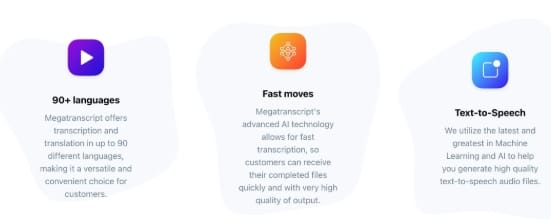
MegaTranscript offers advanced speaker identification along with high-precision transcription. It reduces misunderstanding and editing time by properly separating speakers in podcasts, meetings, and interviews.
2. Natural-SoundingText-to-Speech
Transform text into realistic, non-robotic voiceovers. Perfect for presentations, audiobooks, films, and accessibility requirements.
3.Voice Cloning Technology
Use your own audio samples to create personalized AI voices. The most recent version features emotionally intelligent voices that enhance the emotional impact and naturalness of speech.
4.Speaker Diarization
Automatically recognizes and names various speakers in a conversation. This is particularly useful for podcasts, legal recordings, panel debates, and interviews.
5. Vocal Separation
Use AI to separate between background noise, instruments, and vocals. Ideal for producers that work with technical audio recordings, podcasts, or music.
6. Automatic Subtitles & Captions
Create subtitles instantly and export them in popular formats like SRT and VTT, making your videos more engaging and readily available
7. Multi-Language Support (90+ Languages)
Transcribe and translate content for a global audience. Ideal for international businesses and multilingual creators.
8. Multi-Format Export Options
Download transcripts in a variety of formats, including PDF, SRT, VTT, and others, to facilitate cross-platform content reuse
Pros and Cons
Pros
*High transcription accuracy
*Natural, emotionally aware AI voices
*Supports 90+ languages
*Voice cloning capability
*Multiple export formats
*Lifetime deal saves money
*Perfect for professionals and creators
** 30 days money back guarantee
Cons
# Requires internet connection
# Beginners may need to go through a learning curve for advanced functionalities.
Comparison
Large Call to Action Headline
Other transcription Tool
1. Manual Transcription Services
2. High cost per minute
3. Slow turnaround times
4. Human errors and inconsistencies
5. No subtitles or voice cloning
6. Basic AI Transcription Tools
7. Limited language support
8. No vocal separation
9. Robotic text-to-speech
10. Recurring monthly expenses
MegaTranscript
One-time, lifetime costs
90+ languages are supported.
Voices with emotional intelligence
Cloning voices and diarization
Dubbing, exporting, and subtitles
Scalable and cloud-based
Large Call to Action Headline
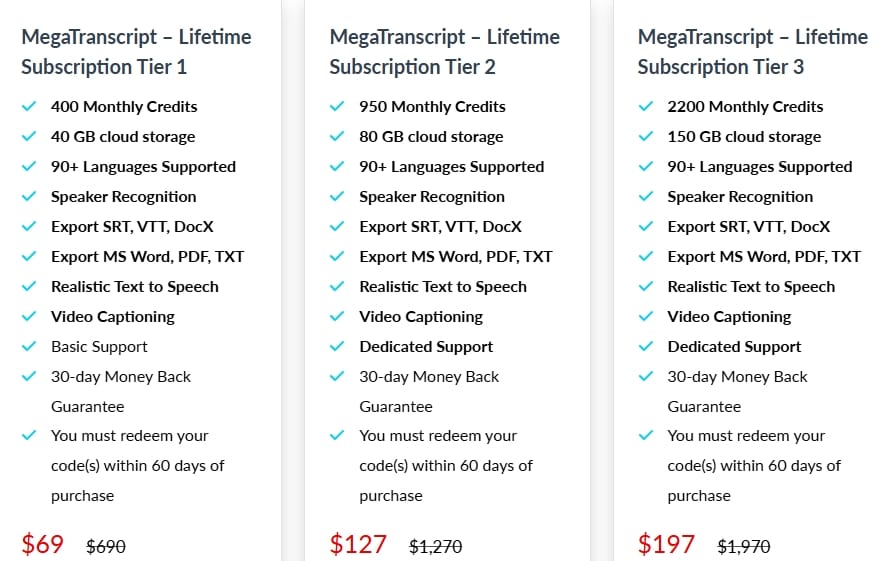
Pricing : Lifetime Deal
Beginner Tips
If you’re new to tools like this, start simple:
Begin with short audio files
Use clean recordings without too much background noise
Don’t worry about perfection—edit after generation
Explore one feature at a time (transcription → subtitles → voice)
Save your outputs for reuse
Once you get used to it, everything becomes much faster.
Common Mistakes to Avoid
Here are a few things that can reduce your results:
Uploading low-quality or noisy audio
Skipping the review step before exporting
Trying to use all features at once
Not using speaker identification properly
Ignoring export formats for different platforms
Small improvements here can make a big difference.
Why I Recommend MegaTranscript
MegaTranscript is a complete content workflow system, not simply another transcription tool. It enables you to easily adapt content across many platforms while saving time and money.
MegaTranscript simplifies transcription, voiceovers, subtitles, and translations into a single, clean dashboard for anyone frustrated of juggling several tools.
Final Thoughts
For anyone working with audio or video content, MegaTranscript is a smart investment.
It fulfills every significant requirement in contemporary multimedia creation, from voice cloning and vocal separation to transcription and subtitles.
It is more appealing because of the lifetime pricing, particularly in contrast to pricey monthly options.
MegaTranscript offers genuine value if you're looking for quicker workflows, accurate transcriptions, multilingual accessibility, and expert voiceovers without going over budget.
It is powerful, practical and created for the content-driven world of today.
Bonus Tip: How to Get Maximum Value
If you want to get the most out of MegaTranscript, don’t just use it for transcription.
Try to build a content workflow like this:
Audio/Video → Transcript
Transcript → Blog post
Transcript → Subtitles
Transcript → Voiceover
This way, one piece of content can be turned into multiple formats.
That’s where the real value comes in—saving time while creating more content.
Frequently Asked Questions (FAQ)
1.Is MegaTranscript beginner-friendly?
Yes. The interface is clean and cloud-based, making it easy to use even for non-technical users.
2. Does it support multiple languages?
Yes, MegaTranscript supports 90+ languages for transcription and translation.
3.Can I use it for podcasts and YouTube videos?
Absolutely. It’s ideal for podcasts, YouTube, interviews, and online courses.
4.Is voice cloning safe and customizable?
Yes. You can create personalized AI voices using your own samples.
5.What if I don’t like it?
You’re protected with a 30-day money-back guarantee.
MegaTranscript Review:All-in-one AI transcription and audio\/video processing platform
Large Call to Action Headline

Hello, I'm Farzana Atika. I write simple and honest reviews of SaaS tools, productivity apps, and business software to help
you discover the best tools to build and grow online.