Learnitive review 2026: is this $49 Dealify lifetime deal worth it for bloggers and academics?
Disclosure: Some links in this article are affiliate links, which means I may earn a commission if you decide to make a purchase—at no additional cost to you. This helps support my work and allows me to continue creating helpful content. I only recommend tools that I have researched and believe are genuinely useful.
I'll be honest with you. When I first saw Learnitive pop up on Dealify, I almost scrolled past it.
Another AI writing tool. Another dashboard full of features I'd probably use twice and forget about.
I've been down that road before. After all, finding a genuine Dealify lifetime deal worth it takes some digging — most tools disappoint once you're past the landing page.But something made me stop.
The pricing was too interesting to ignore — $49 for lifetime access, down from $500. And the feature list wasn't the usual "write blog posts and emails" template. This one was talking about academic paper searches, plagiarism checks, code execution inside the editor, vector diagram creation, and a Grammarly integration all in one place.
So I took a proper look. Here's what I actually found.
What is Learnitive?
Learnitive is an interactive AI-powered platform built specifically for academics, copywriters, and educational organizations. It provides a wide range of tools and capabilities, including an AI writer, to improve learning and content creation.
The easiest way to think about it: imagine a writing workspace that combines an AI content generator, a plagiarism checker, an academic research database, a code playground, and a project management system — all in one place without making you switch tabs. That's the idea.
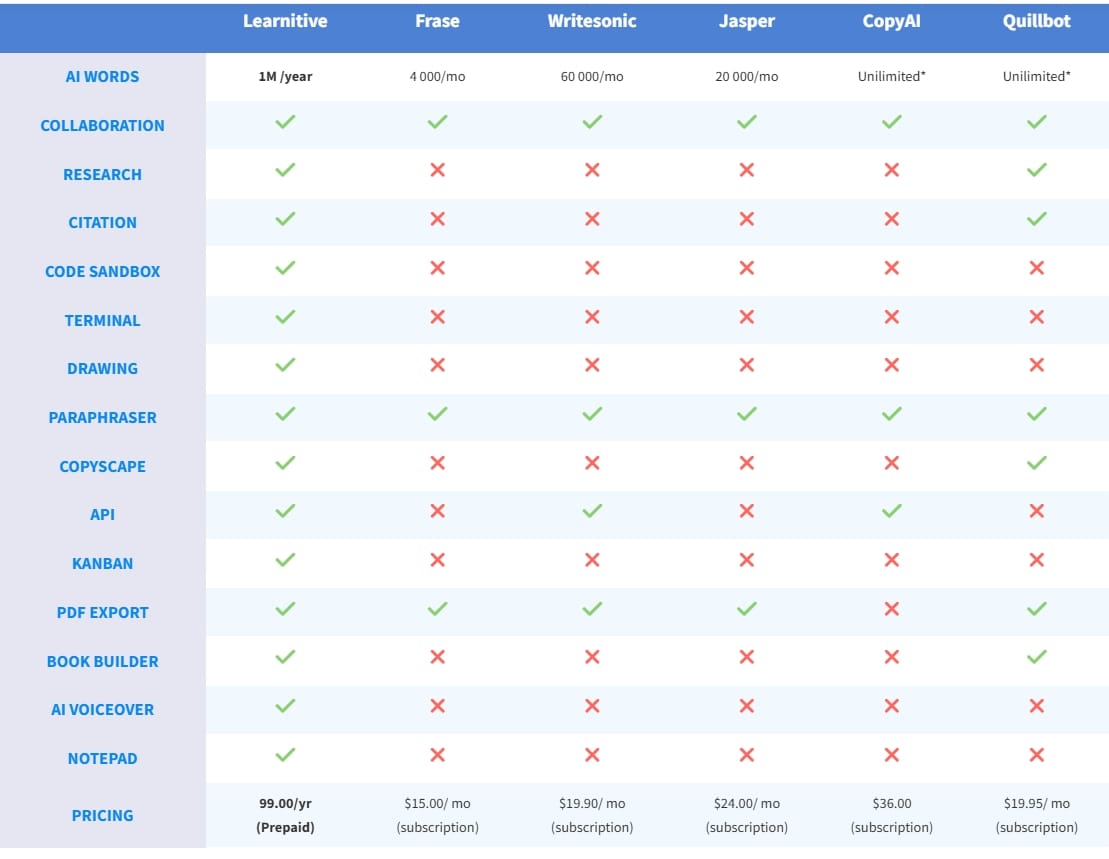
It positions itself as an alternative to tools like Frase, Jasper, CopyAI, Quillbot, and WriteSonic — but built specifically for academics, copywriters, and education agencies.
That's a specific audience. And that specificity is actually one of the things I respect about it. It's not trying to be everything for everyone.
What you actually get : Learnitive features breakdown
Let me walk through the features that matter —
1.The Learnitive AI writer: what it can actually do
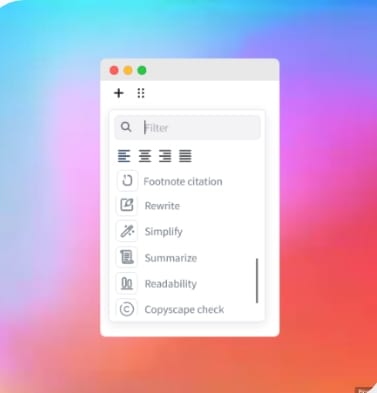
The standout core feature is the AI writer, which generates Copyscape-verified text content, programming codes, and vector illustrations like flowcharts and UML diagrams, ensuring quality and originality.
The Copyscape integration is the feature most AI writers skip entirely. For bloggers who care about SEO, and especially for academics who need original content, built-in plagiarism checking isn't a nice-to-have — it's essential.
The fact that Learnitive bakes this directly into the writing workflow rather than making you export and check separately is a genuine time-saver. This makes Learnitive one of the few AI writing tools for bloggers that takes SEO originality seriously from day one.
You can also Copyscape individual paragraphs using your own Copyscape API key, and create and execute codes and OS commands directly inside the AI writer itself.
That last part — running code inside the editor — is genuinely unusual. If you're a developer or educator teaching programming, this changes your workflow in a meaningful way.
2.Academic research built in: 250 million papers inside the editor
This is where Learnitive separates itself most clearly from standard AI writing tools.
The Learning Assistant can generate codes, auto-insert references, and support research with access to over 250 million academic papers.
Think about what that means in practice. You're writing a blog post or an article, you need to back up a claim with a real source, and instead of opening another tab and searching Google Scholar — you search directly inside the editor and insert the reference automatically.
No copy-pasting, no formatting citations manually. For anyone serious about AI tools for academic writing, this is the feature that makes Learnitive genuinely different.
The advanced AI writer can search for a key term across millions of academic papers, Wikipedia entries, and Pexels images, and insert references or embed them as needed.
For content marketers who want to write more authoritative, well-cited articles, this feature alone is worth thinking about seriously.
3.The 100+ AI prompts
Learnitive excels in content creation by offering 100+ AI prompts for both writing and coding, giving users ample resources to tune output to their specific needs.
In practice, this means you're not staring at a blank "write me something" box. The prompts guide you toward specific outputs — blog introductions, academic paragraphs, code explanations, product descriptions — which matters more than people realize when you're trying to produce consistently good work quickly.
4.Grammar, voice, and quality checking
The platform integrates Grammarly to suggest replacements for identified errors, and includes widgets to review spelling, grammar, punctuation, clarity, and engagement, as well as neural text-to-speech capabilities.
Again — this is all inside one editor. You write, it checks, it reads back to you in a neural voice if you want. That's a complete content production loop without leaving the platform.
5.Project management that actually makes sense
Users can manage projects with Kanban boards for a streamlined workflow, alongside a notepad for taking notes and organizing ideas.
I know "Kanban board" sounds like a feature added to pad out a pricing page.
But if you're managing multiple blog posts, academic projects, or client deliverables simultaneously, having your tasks and your writing workspace in the same dashboard removes a real layer of mental overhead.
6.For developers and agencies
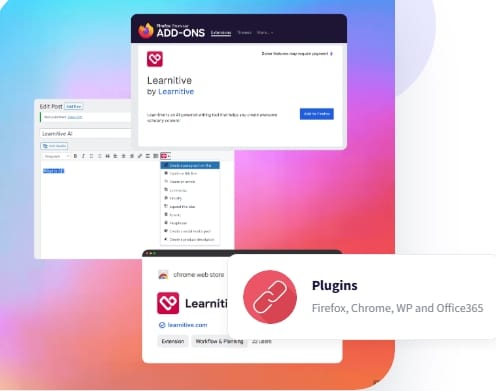
Educational agencies can connect their platforms with Learnitive via API for smooth and fast content creation. Learnitive's WordPress plugin is available for both the WP Classic and Gutenberg editors.
There's also Chrome and Firefox extension support, MS Office integration, and the ability to white-label the workspace for agencies who want to offer it under their own brand. That's a meaningful set of options for anyone running a content team.
Who is Learnitive built for? Best use cases in 2026
This is the most important question to answer honestly before recommending any tool.
Learnitive is built for three types of people:
Academics and students who need to write well-cited, original content and want research built directly into their writing process. The 250 million academic paper database and automatic reference insertion are genuinely useful here in a way that generic AI writers are not.
Bloggers and content marketers who want to produce SEO-friendly, plagiarism-checked content without juggling multiple tools. The Copyscape integration, Grammarly checking, and Pexels image search in one place make this a reasonable all-in-one content production environment.
Developers and educators who need to write about code or teach programming concepts and want to run and test code directly inside their writing environment — without setting up a separate IDE or VM.
If you don't fall into one of those three categories, there are probably simpler tools for you. Learnitive's depth is a strength for the right user and unnecessary complexity for the wrong one.
Pros
Built-in Copyscape integration — plagiarism checking inside the editor, not as an afterthought
Access to 250 million academic papers with auto-reference insertion
Code execution inside the browser — genuinely rare in a writing tool
100+ AI prompts to guide and tune output
Grammarly integration for grammar, clarity, and engagement checking
Neural text-to-speech built in
Vector diagram creation (flowcharts, UML) without needing external tools
Unlimited Pexels image search and embed
WordPress, Chrome, Firefox, and MS Office integrations
Kanban boards, calendar, and notes for project management
API access for agencies and developers
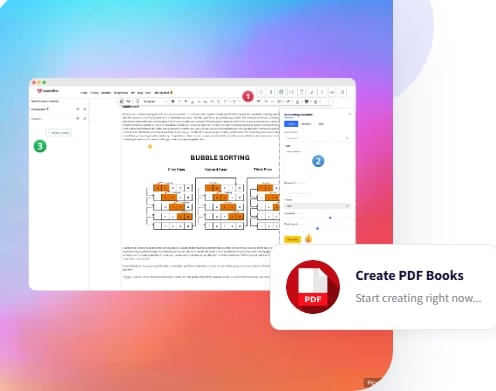
PDF export with clean formatting
Lifetime deal at $49 on Dealify — one payment, no subscription
Cons
The platform could benefit from improvements in user interface design and AI interaction capabilities — the editor is feature-rich but not the most intuitive for new users
Very limited Trustpilot presence — rated 3.7/5 based on only one review, which makes it hard to gauge broader user sentiment
No free plan available — you need to commit to the paid lifetime deal to test it fully (though the 30-day money-back guarantee covers this)
The depth of features means there's a learning curve — this is not the tool you open and immediately know how to use
The Copyscape integration requires your own Copyscape API key, which is an additional cost to factor in
Less suitable for casual users who just need quick content output
Beginner Mistakes When Using Learnitive
1. Overloading content with AI output
Even with powerful tools, too much AI-generated content can feel robotic.
Fix:
Edit manually
Add personal insights
Use your own examples
2. Skipping plagiarism checks
Even though Learnitive supports Copyscape, some users skip it.
Big mistake for:
SEO
Blog credibility
3. Not organizing projects
Learnitive includes Kanban boards and notes—but many ignore them.
Result:
Messy workflow
Lost ideas
Slower production
4. Using it for the wrong purpose
Learnitive is powerful, but not for everything.
Not ideal for:
Quick social captions
One-click content generation
Best for:
Research-based writing
Academic content
SEO blogs with references
The Learnitive Dealify lifetime deal: is $49 actually worth it?
Let's be direct about the value here.
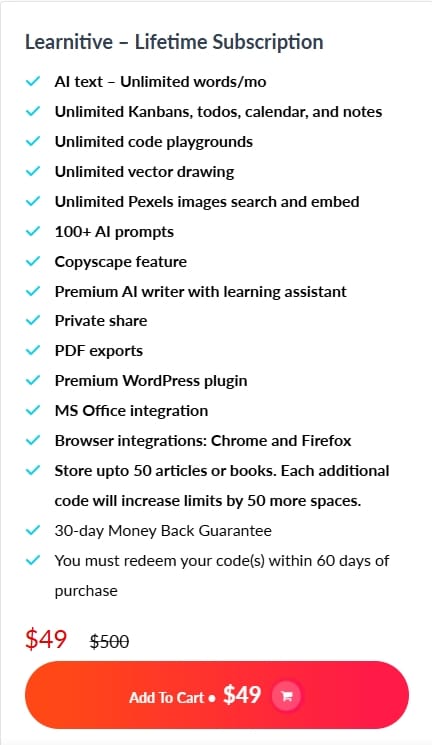
The Dealify lifetime plan at $49 includes unlimited AI words per month, unlimited Kanbans, calendar, notes, code playgrounds, and vector drawing, plus 100+ AI prompts, Copyscape feature, Grammarly integration, WordPress plugin, browser integrations, and PDF exports. You also get up to 50 article or book storage spaces, with additional codes expanding that limit.
Compare that to what you'd pay monthly for separate tools: a Grammarly subscription, a plagiarism checker, an AI writer, and a project management tool. Even being conservative, you're looking at $40–$80 per month for an equivalent stack. As a Jasper alternative for academics or a Quillbot alternative with more features, Learnitive's pricing is hard to argue with.
At $49 lifetime, Learnitive pays for itself in well under two months for anyone who uses these features regularly. The money-back guarantee means you can test it properly without risk.
The honest caveat: you need to actually be someone who writes content that requires citations, plagiarism checking, or code integration. If you're a casual blogger who just wants quick output, Learnitive's feature set may feel like overkill compared to simpler tools.
My honest verdict: should you buy Learnitive in 2026?
Learnitive isn't trying to compete with ChatGPT or Jasper for general-purpose AI writing. That's not the point.
What it's actually doing is building a specialist workspace for people who write serious content — content that needs to be researched, cited, checked for originality, and produced consistently. For that audience, no other tool at this price point offers this combination of features in a single place.
The $49 lifetime deal on Dealify is genuinely good value if the use case fits. For academics writing research-backed content, bloggers who care about SEO originality, or educators building course content with code examples — this is worth a serious look. If you've been comparing Learnitive vs Jasper or looking for a cheap AI writing tool with plagiarism check, this is the answer.
If you're just looking for a quick AI blog post generator, you probably don't need this level of depth.
Check the current pricing and what's included on Dealify — the lifetime deal terms can change, and the 30-day money-back guarantee means there's no risk in trying it properly before deciding
Bonus Tips: How to Get the Best Results from Learnitive
1. Combine AI + Research for authority
Don’t just generate content—support it with references.
This helps:
SEO ranking
Trust
Content quality
2. Create a repeatable workflow
Use this simple system:
Generate draft
Add research references
Run plagiarism check
Improve with Grammarly
Export or publish
This saves time long-term.
3. Use prompts strategically
Instead of generic prompts, try:
“Write a research-backed blog intro on…”
“Explain this concept with citation…”
Better prompts = better output
4. Use it for high-value content only
Don’t waste it on low-effort content.
Use Learnitive for:
Blog posts
Research articles
Educational content
5. Combine with other tools (smart way)
Even though it’s all-in-one, you can still combine it with:
ChatGPT for ideation
Other tools for design or publishing
Hybrid workflow = best resultsFinal Tip
The biggest difference between average and top users:
Average users generate content
Smart users refine, structure, and validate it
Frequently asked questions
1.Is Learnitive worth it in 2026? For academics, bloggers who need plagiarism checking, and educators working with code, yes — the $49 lifetime deal on Dealify is genuinely good value. If you just need a quick AI writing tool, simpler options exist.
2.Is the Learnitive Dealify lifetime deal legit? Yes. Dealify offers a 30-day money-back guarantee on all deals. The lifetime plan gives you unlimited AI words per month, Copyscape integration, 250 million academic papers, and all core features for a one-time payment.
3.What is the best Learnitive alternative? For general AI writing: Jasper or CopyAI. For academic writing with citations: there's nothing at this price point with the same feature set. For plagiarism checking only: Copyscape or Grammarly Premium.
4.Does Learnitive have a free plan? No free plan is available. However, the 30-day money-back guarantee from Dealify means you can test the full platform without financial risk before committing.
5.Is Learnitive good for bloggers? Yes, particularly bloggers who care about SEO originality. The built-in Copyscape integration, Grammarly checking, and access to 250 million academic papers for citations make it useful for producing authoritative, search-friendly content.
Learnitive review 2026: is this $49 Dealify lifetime deal worth it for bloggers and academics?
Large Call to Action Headline

Hello, I'm Farzana Atika. I write simple and honest reviews of SaaS tools, productivity apps, and business software to help
you discover the best tools to build and grow online.