Joyspace AI Review: Fast Captions for Better Videos
Disclosure: Some links in this article are affiliate links, which means I may earn a commission if you decide to make a purchase—at no additional cost to you. This helps support my work and allows me to continue creating helpful content. I only recommend tools that I have researched and believe are genuinely useful.
It can be hard to create captions for videos. If you've tried it manually, you are aware of how time-consuming it can be—it can take hours to type out each line, synchronize it flawlessly with the audio, and make it appear clean on the screen.
Joyspace AI Captions solves this need. You will save a ton of time because this tool is created to generate transcripts and captions. All you have to do is upload your video, and the software will handle the rest.
In this joyspace AI captions review ,I'll go over Joyspace AI Captions' features,, pricing plans, and usefulness for creators like you .
What Is Joyspace AI?
Joyspace AI Captions is a tool that helps you create captions and transcripts for videos or podcasts automatically. Instead of doing everything manually, it uses AI to turn speech into text and place captions directly on your video. It is an automatic captions , transcription and subtitle generator.
The idea is simple—it saves you time. Writing subtitles line by line can take hours, but with this tool, it only takes a few clicks. You can also adjust how your captions look by changing fonts, colors, styles, and even adding emojis.
These days, a lot of people watch videos without sound, particularly on websites like YouTube, Instagram, and TikTok. Captions have grown crucial as a result. They make it easier for viewers to follow along immediately,which can improve watch time and overall engagement.
How Joyspace AI Works
The process is actually pretty simple. You don’t need any advanced editing skills to get started.
Here’s how it usually works with Joyspace AI Captions:
1.Upload your video or podcast.
2.The AI automatically turns the speech into text.
3.Captions are added to your video timeline.
4.You can tweak the fonts, colors, and style to match your content.
4.Export the final video when you’re done.
In most cases, the whole thing only takes a few minutes. If you’re someone who creates content regularly, that time saving can really add up and make your workflow much easier.
Who Should Use Joyspace AI?
This tool isn’t just made for professional video editors. Honestly, almost anyone who works with videos can find it useful in some way.
Here are a few people who might benefit from it:
Content creators – If you’re posting on platforms like YouTube, TikTok, or Instagram, adding captions quickly can really help improve engagement.
Digital marketers – It’s helpful for creating quick promo videos or social media content without spending too much time editing.
Podcast creators – You can turn your audio into short captioned clips, which are great for sharing on social media.
Agencies – If you’re handling multiple clients, tools like Joyspace AI Captions can save a lot of time (and honestly, a bit of stress too).
Small businesses – You don’t always need to hire an editor. You can create decent-looking videos on your own with minimal effort.
At the end of the day, if you’re working with video content regularly, having something like this just makes things easier. It’s not perfect, but it definitely helps speed things up.
Features That Stand Out
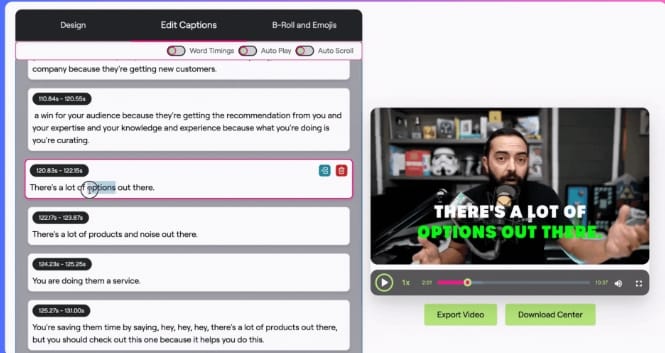
1.AI Transcription
One thing I noticed right away is the automatic AI transcription feature. You just upload your video, and the tool listens to the audio and turns it into text. It’s surprisingly accurate most of the time.
If you’ve ever tried typing captions manually, you’ll know how much time this can save. Honestly, this feature alone can cut down a lot of editing work.
2.One-Click AI Caption Generator
Once the transcription is ready, adding captions is very straightforward. You don’t have to place each line manually—the tool handles it for you.
For people who upload videos regularly, this makes a big difference. It turns what used to be a long task into something you can finish in minutes.
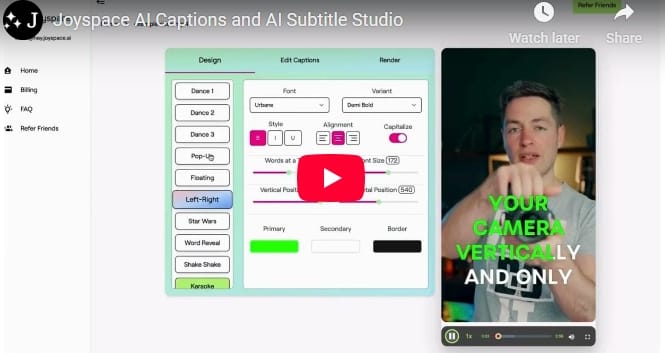
3.Custom Caption Styles
Captions don’t have to look plain or boring anymore. With Joyspace AI Captions, you can easily adjust how they look.
You can change things like:
fonts
colors
text size
position on the screen
animations
emojis
This is useful if you want your videos to match your personal style or brand.
4.Built-In B-Roll Library
Another feature that stood out to me is the built-in B-roll library.
If you’re not familiar, B-roll is extra footage or visuals that make your video more interesting. It helps keep viewers engaged instead of just watching a static clip.
Having this built into the platform is a nice bonus—you don’t have to search for extra clips elsewhere.
5.4K Video Export
Some tools limit high-quality exports unless you upgrade to expensive plans. That can be frustrating.
With Joyspace AI Captions, you can export videos in 4K, which helps maintain a clean and professional look, especially if you care about video quality.
6.Multi-Language Support
The platform also supports multiple languages, which is great if your audience isn’t just local.
Some of the supported languages include:
English
Spanish
French
German
Japanese
Hindi
Korean
Arabic
This makes it easier to reach a wider audience without needing separate tools.
Benefits of Using Joyspace AI
1.Saves Time
If you’ve ever added captions manually, you know how long it can take. Even a short video can eat up an hour or more just syncing text properly.
Tools like Joyspace AI Captions speed things up a lot. Instead of doing everything by hand, you can get captions ready in just a few minutes.
For people who post regularly, that time adds up fast. It’s not unusual to save 10–20 hours in a week.
2.Improves Engagement
A lot of people watch videos without sound, especially on apps like TikTok and Instagram.
Captions make sure your message still gets across. When viewers can follow along easily, they’re more likely to keep watching—and that usually means better engagement.
3.Makes Videos More Accessible
Captions aren’t just about style—they make your content easier for more people to understand.
They’re especially helpful for:
people who are hearing impaired
viewers who aren’t fluent in your language
anyone watching in a quiet place without sound
This simple addition can help you reach a much wider audience.
4.More Professional Look
Clean, well-designed captions can instantly make a video feel more polished.
If you’re creating content for a brand or business, that extra level of quality can make a big difference in how people see your work.

Pros and Cons
Advantages
Simple interface:
No complicated setup is required to begin writing captions.
Automatic transcription:
Subtitles no longer need to be manually written thanks to automatic transcription.
Customizable captions:
You can add animations or emojis and alter the fonts, colors, sizes, and locations.
Built-in B-roll content:
Extra visuals are added to your videos to increase audience engagement.
Support for multiple languages:
This feature makes it ideal for audiences from throughout the world.
4K video export:
Export your videos in 4K to maintain a clean, polished appearance.
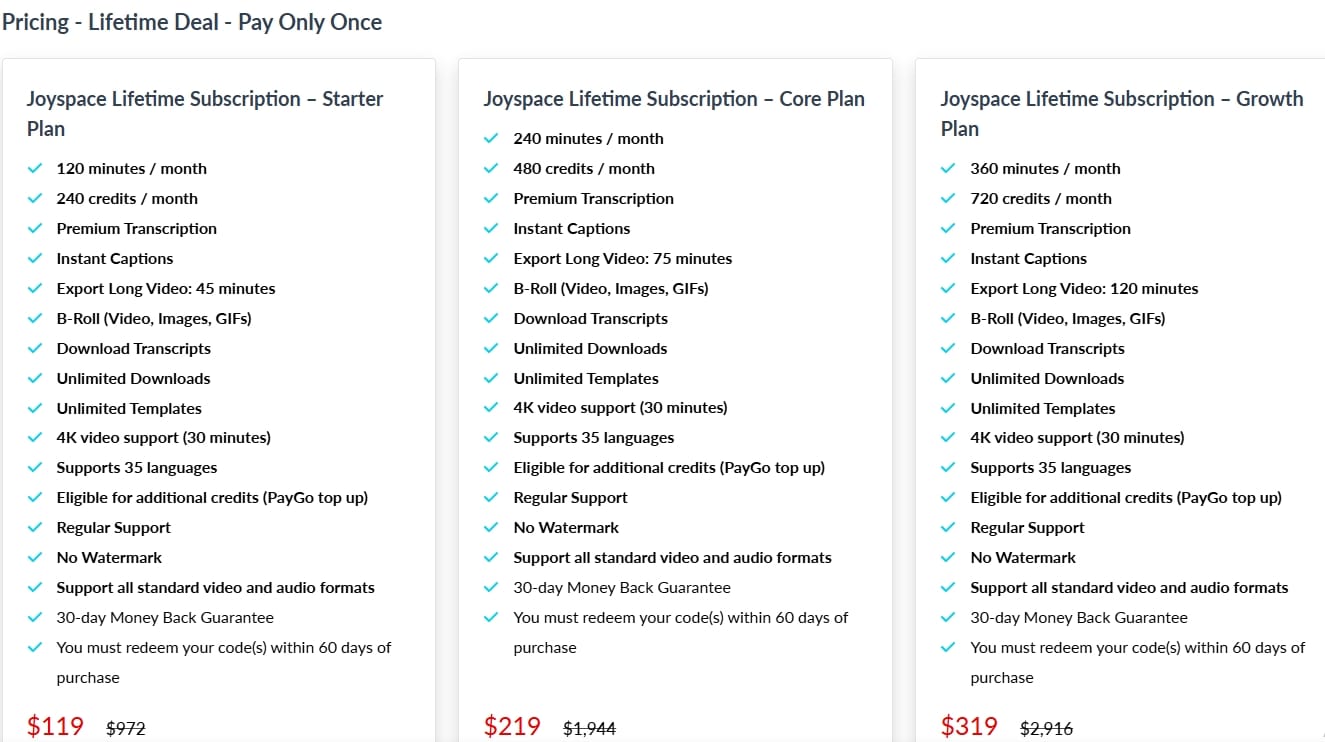
Lifetime pricing option:
Over time, a single payment can result in cost savings.
Drawbacks
Monthly minute limits: The amount of time you can caption or transcribe is limited by each plan.
Requires internet:
In order to utilize the platform, you must be online.
Manual tools may still be preferred by experienced editors. If you're picky about fine tweaks, conventional editing
Best Way to Use This Tool
To get the best results, it helps to keep things simple and consistent.
Start by uploading clear audio videos (better audio = better captions)
Let the AI generate captions first, then review quickly
Customize styles to match your brand (colors, fonts, size)
Use short clips for faster processing
Export in high quality for better presentation
The goal is to use it as a time-saving tool, not a perfection tool.
✔ Beginner Tips
If you’re new, these tips will help you avoid confusion:
Start with short videos before trying long ones
Use simple speech for better transcription accuracy
Don’t over-edit captions at first
Test different caption styles
Keep your workflow simple
The more you use it, the faster and easier it becomes.
Common Mistakes to Avoid
Many users make small mistakes that reduce results:
Uploading low-quality audio
Not checking captions before exporting
Overcomplicating styles
Wasting time on perfect edits
Ignoring timing adjustments
Keep it simple—speed is the real advantage here.
Joyspace AI vs Other Caption Tools
Some other tools, like Submagic or Kapwing, also offer AI-powered captions. The difference is that most of them charge a monthly fee.
With Joyspace AI Captions, you pay once for a lifetime subscription, which is really appealing if you want a one-time purchase instead of ongoing payments.
It’s not a full video editing program, but when it comes to generating captions quickly and easily, it gets the job done.
Why I Would Recommend It
After trying out the features, what impressed me most about Joyspace AI Captions was how much time it can save. The interface is simple and intuitive, but what really stood out was how quickly it generated captions for my videos.
If you create content regularly, video editing can easily become overwhelming. A tool that automatically produces captions and transcripts removes a big part of that workload. For creators, marketers, and small businesses, saving this kind of time can make a noticeable difference in productivity and workflow.
Final Thoughts
AI tools are gradually changing today's video creation process. The majority of the process can now be automated, saving creators from spending hours on tedious editing tasks. Joyspace AI Captions specializes in captioning and transcription, handling both tasks fast and precisely.
This tool is definitely worth checking out if you regularly create videos and want to simplify your workflow. It can help you save time and reduce the stress of editing.
Conclusion
These days, captions are almost essential for video material, not just extra. Since lots of people watch videos without sound, subtitles make the content easier for them to quickly understand. For creators, tools like Joyspace AI Captions greatly simplify and speed the process.
No tool is flawless, of course. However, anyone who frequently deals with video footage may find it to be a helpful choice given the capabilities and lifetime cost.
Bonus Tip: How to Get Maximum Value
If you want to get the most out of Joyspace AI Captions, use it consistently as part of your content process.
Instead of using it occasionally, try to:
Add captions to every video
Repurpose content into short clips
Create multiple videos in batches
This is where the tool really shines.
The more content you produce, the more time you save—and that’s where the real value comes in.
FAQ
What does Joyspace AI do?
Joyspace AI automatically generates captions and transcripts for videos and podcasts.
Is Joyspace AI beginner friendly?
Yes. The platform is simple to use and does not require advanced editing skills.
Does it support multiple languages?
Yes. The platform supports more than 30 languages.
Can I export videos in 4K?
Yes, 4K video export is available.
Is there a refund policy?
Yes. The platform offers a 30-day money-back guarantee.
Large Call to Action Headline
Joyspace AI Review: Fast Captions for Better Videos
Large Call to Action Headline

Hello, I'm Farzana Atika. I write simple and honest reviews of SaaS tools, productivity apps, and business software to help
you discover the best tools to build and grow online.