1minAI Review: One Affordale Tool to Replace All AI ?
Disclosure: Some links in this article are affiliate links, which means I may earn a commission if you decide to make a purchase—at no additional cost to you. This helps support my work and allows me to continue creating helpful content. I only recommend tools that I have researched and believe are genuinely useful
If you are a blogger, freelancer, or content creator, chances are you are already paying for at least two or three different AI tools every single month. Maybe ChatGPT for writing, Midjourney for images, and ElevenLabs for audio.
It adds up fast — easily $50 to $80 per month — and switching between different platforms wastes more time than most people realise.
I have been there. Juggling multiple tabs, multiple logins, multiple credit cards. It is exhausting.
That is why when I came across the 1minAI lifetime deal on Dealify, I decided to test it properly before recommending it to anyone. This is my honest, personal review after spending real time with the tool — the good parts, the honest warnings, and everything in between.
What is 1minAI?
1minAI is an all-in-one AI platform that brings together the most powerful AI models — including ChatGPT, Claude, Gemini, and image generation tools — into a single dashboard. Instead of managing five different subscriptions, you log in once and access everything from one place.
The concept is simple: one login, one payment, one dashboard for all your AI needs.
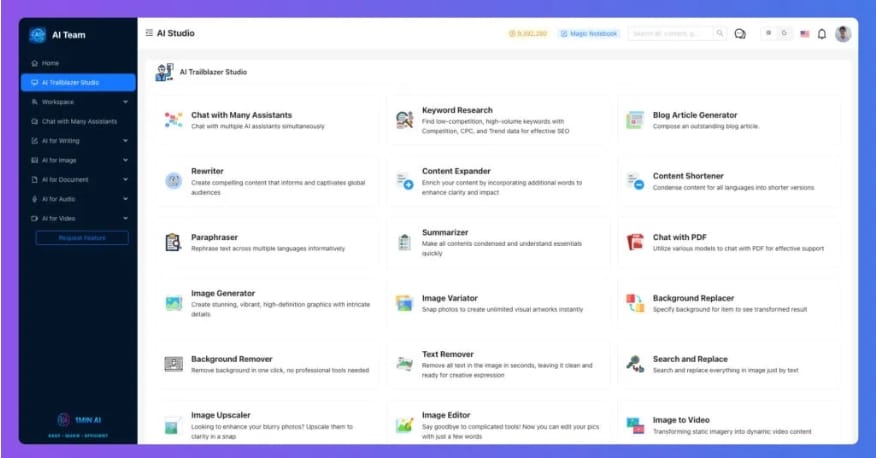
It covers four main areas:
Writing — blog posts, rewrites, summaries, grammar fixes, SEO keywords
Images — generate images, remove backgrounds, improve quality, replace objects
Audio — convert text to voice, transcribe speech, translate audio
Video — create simple videos from images and scripts
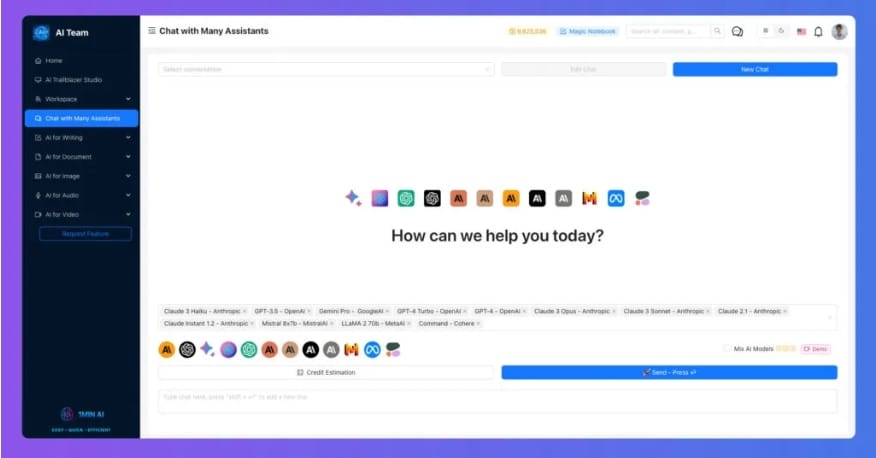
What makes 1minAI different from a typical AI writing tool is that it does not lock you into one AI model. You can switch between ChatGPT, Claude, Gemini, and others depending on which gives the best result for your specific task. That flexibility alone is genuinely useful.
Who Should Use 1minAI?
This tool works best for people who already rely on AI regularly in their work. Specifically:
Content writers and bloggers who publish multiple articles per week and want to speed up the research, drafting, and editing process
Faceless YouTube channel creators who need scripts, voice, and simple video creation without expensive separate tools
Digital marketers and freelancers managing content for multiple clients
Students and researchers who need to summarise long documents and translate content quickly
Online business owners who want to reduce their monthly software costs without sacrificing quality
If any of these describe you and you use AI tools regularly — at least a few times per week — then 1minAI makes strong practical sense.
Who should not use this
I want to be honest here because I think a lot of reviews skip this part.
1minAI is not a good fit if:
You only use AI occasionally — maybe once or twice a month. The tool has enough features that it will feel overwhelming for light use, and you will not get enough value to justify even the one-time cost.
You prefer a very simple, minimal tool with no learning curve. Because 1minAI covers so many features, there is a short but real adjustment period when you first start using it.
You are looking for a professional-grade Photoshop replacement or a full video editing suite. The design and video tools are practical for bloggers and content creators, but they are not at the level of dedicated specialist software.
Being clear about this is important. A tool being good does not mean it is right for everyone.
Key Features & Benefits
1. Multiple AI Models in One Place
This is the standout feature. Instead of paying separately for ChatGPT Plus and Claude Pro, you access both through 1minAI. Different models have different strengths — Claude tends to write in a more natural tone, while ChatGPT is faster for structured content. Having both available means better results for different tasks.
2. Writing Made Simple for Bloggers
For content creators publishing regularly, the writing tools save a significant amount of time. You can generate full article drafts, rewrite sections, summarise long research documents, check grammar, and even get SEO keyword suggestions — all from one dashboard.
This is not about replacing your writing. It is about removing the slow, frustrating parts so you can focus on adding your own voice and expertise.
3. Built-In Image Creation and Editing
You no longer need a separate Midjourney subscription just to create featured images for your blog. 1minAI includes image generation from text prompts, background removal, quality enhancement, and object replacement. For social posts, thumbnails, and quick design work, this covers most of what a blogger actually needs.
4. Audio and Video for Faceless YouTube Channels
If you run or plan to run a faceless YouTube channel, this feature is particularly valuable. You can write your script, convert it to realistic voice audio using text-to-speech, and create simple videos from images — without touching a microphone or camera. This full workflow inside one tool is something most YouTube automation creators pay for separately across three or four platforms.
5. One-Time Payment — No Monthly Fees
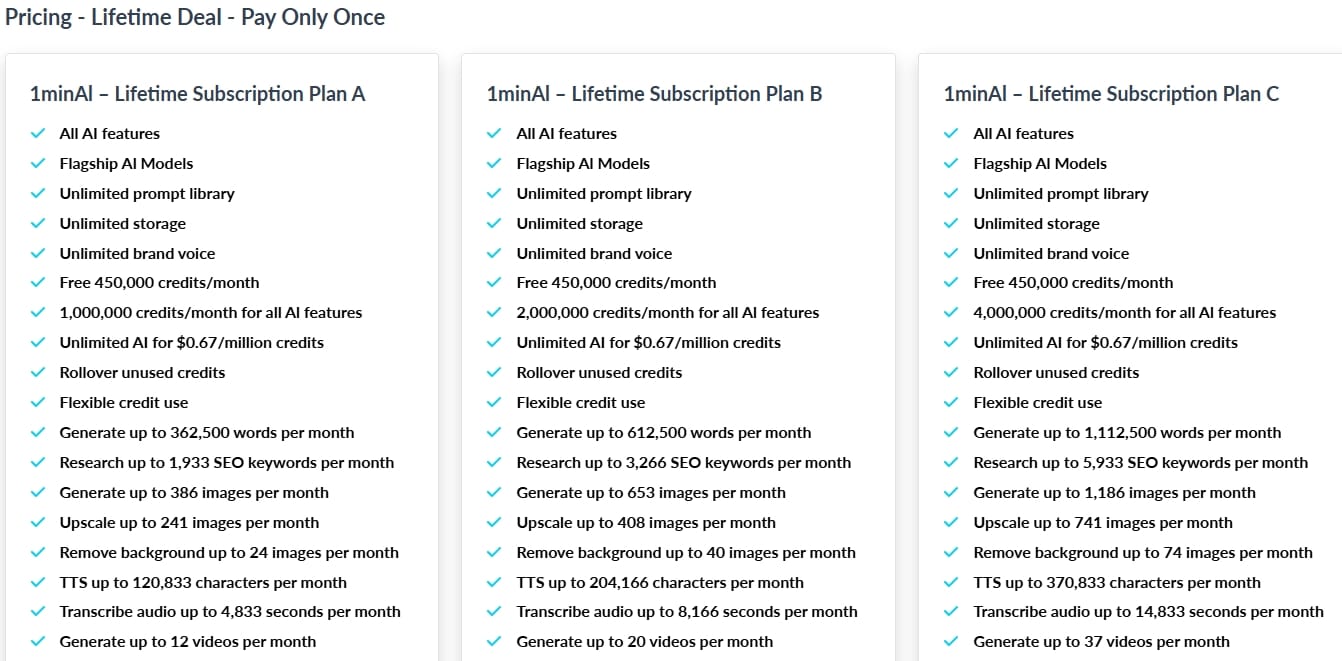
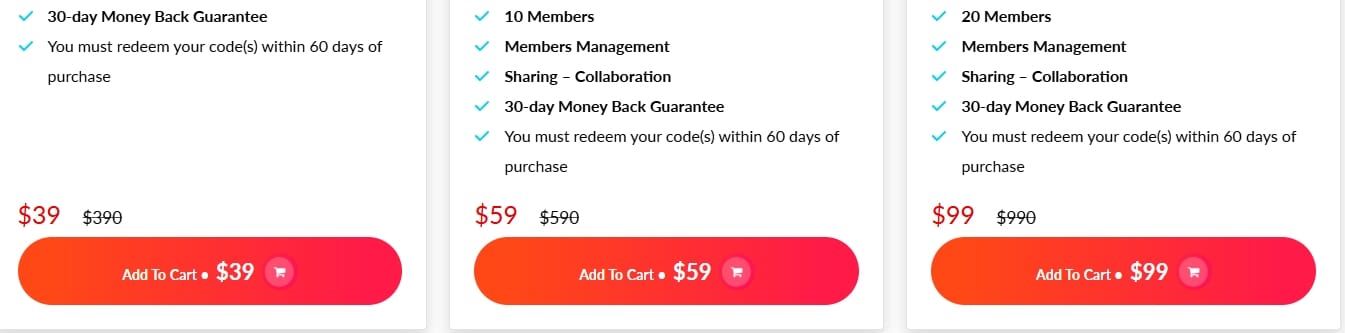
This is where the real value sits. The 1minAI lifetime deal on Dealify is currently priced at $39 — a single payment with no recurring fees. Monthly credits are included and reset every month, so you are not stuck with a dead account after purchase.
Compared to paying $20 per month for ChatGPT Plus alone — which is $240 per year — the maths becomes very straightforward.
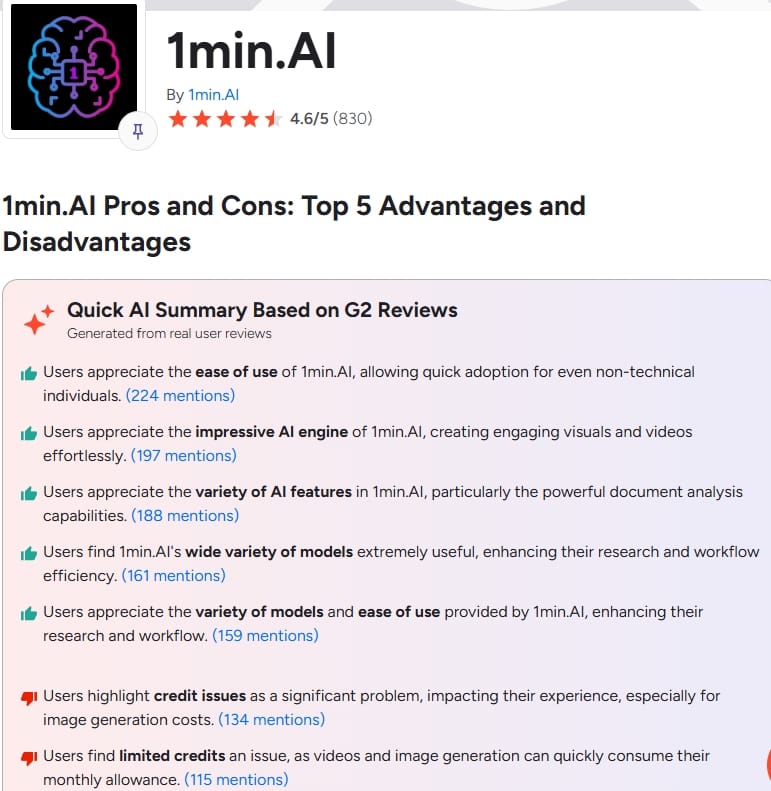
Pros and Cons
Pros
Access to multiple top AI models in one dashboard — ChatGPT, Claude, Gemini
Covers writing, images, audio, and video — reduces the need for multiple subscriptions
One-time $39 payment — monthly credits included with no recurring fees
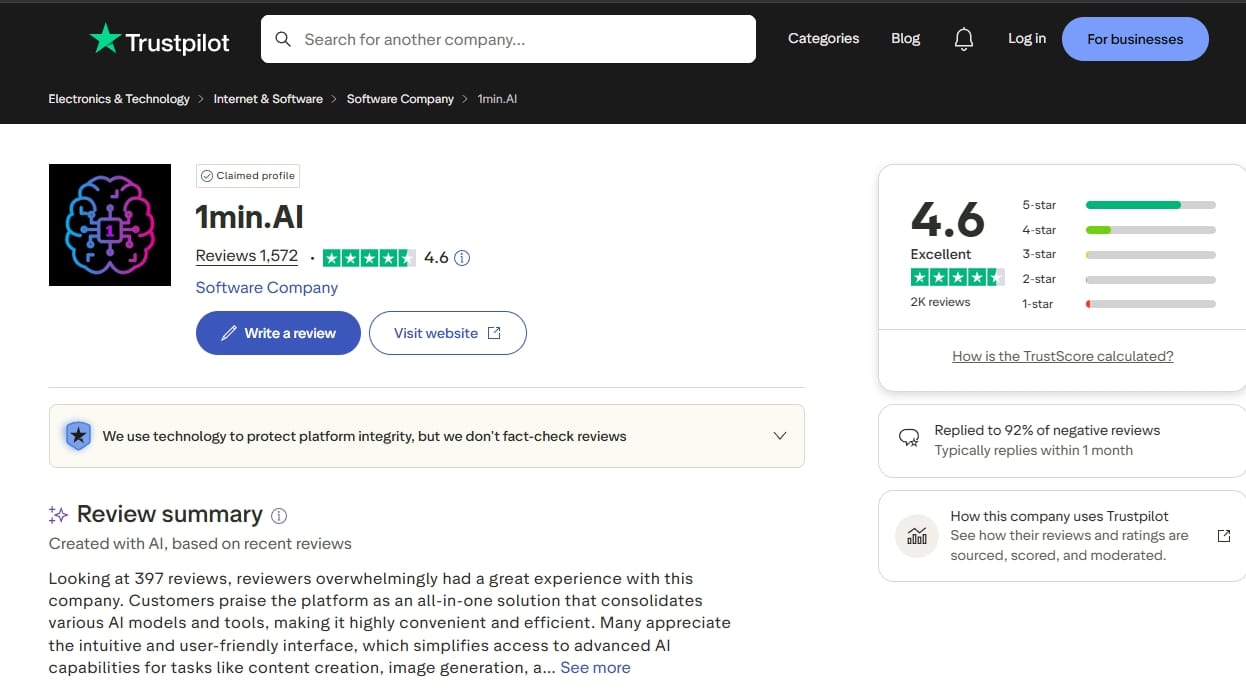
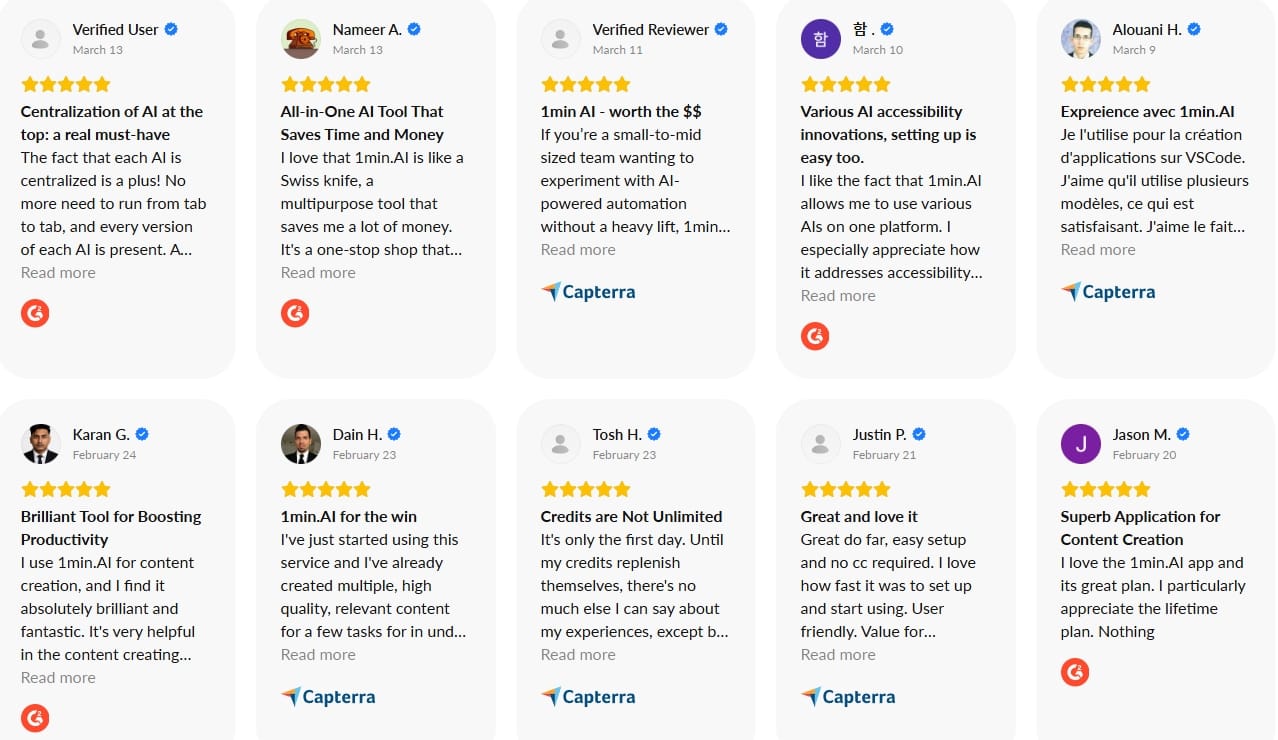
4.5 stars on Trustpilot from real users — not inflated review scores
Genuinely useful for bloggers, freelancers, and YouTube creators
Cons
Takes time to explore all features — not immediately intuitive for beginners
Credit system needs some learning — easy to waste credits early on
Image and video tools are good but not at the level of specialist standalone apps
Not ideal for users who only need one specific AI function
Comparison
Using Separate Tools
Multiple subscriptions
Higher monthly costs
Time wasted switching between apps
Using 1minAI
One simple dashboard
Lower overall cost
Faster, more streamlined workflow
The difference is clear: 1minAI makes your work more efficient and budget‑friendly.
Beginner Tips : Start Here Before You Touch Anything Else
.The biggest mistake new users make is opening 1minAI and trying every feature on day one. That is a fast way to feel overwhelmed and waste your monthly credits.
Here is what I recommend instead:
Week 1 — Pick one use case only. If you are a blogger, start with the writing tools. If you are a YouTube creator, start with text-to-speech. Spend your first week getting comfortable with just that one area.
Week 2 — Test different AI models. Once you know how to use the writing tools, try running the same prompt through ChatGPT and Claude inside 1minAI. The output quality difference will surprise you. Different models genuinely suit different types of content.
Week 3 — Add a second feature. Once writing feels natural, bring in the image generation tools. Create your next blog post featured image inside 1minAI instead of Canva.
Always watch your credits. The credit counter is visible in your dashboard. Check it before starting any session and plan your tasks accordingly. Image generation uses more credits than writing, so be mindful when experimenting.
Common Mistakes to Avoid
After testing the tool and reading what other users say, these are the patterns I see most often:
Trying everything immediately. The tool has a lot of features. That is a strength, but it becomes a weakness if you try to master all of them before understanding any of them. Go slow.
Expecting perfect output without improving your prompts. The quality of what any AI tool produces depends almost entirely on the quality of your instructions. Vague prompts produce vague content. Specific, detailed prompts produce genuinely useful content. This is a skill worth developing.
Forgetting to test different models. Many users just stick with the default AI model and never explore the others. This means they are missing significantly better results for certain types of tasks. Claude often produces more naturally flowing prose. ChatGPT tends to be faster for structured lists and summaries.
Wasting credits on experiments. If you want to test a feature, plan your test in advance. Know what you want to produce before you start. Random experimentation burns through credits faster than actual productive use.
Honest Recommendation
After spending real time with 1minAI, here is my honest position:
If you create content regularly — at least three to five times per week — and you are currently paying for multiple AI subscriptions, the 1minAI lifetime deal on Dealify at $39 is a straightforward decision. You will recover that cost in under a month compared to even just one ChatGPT Plus subscription.
The tool is not without its limitations. The learning curve is real. The design and video features will not replace specialist software for professionals. And it is not the right choice for casual, infrequent AI users.
But for the audience it is designed for — bloggers, content creators, freelancers, and faceless YouTube channel operators — it does what it promises. Everything in one place, no monthly fees, and real flexibility in choosing which AI model to use for each task.
I would recommend it. Not because it is perfect, but because for the right user it genuinely saves money, saves time, and simplifies a workflow that has become unnecessarily complicated.
Final Thoughts
The core promise of 1minAI is simple: stop paying for five different AI subscriptions and manage everything from one dashboard. After testing it honestly, that promise holds up — with some reasonable caveats.
It works best for people who are already committed to using AI in their daily content workflow. It requires a short learning period. And the credit system needs some attention at the start.
But the value of the lifetime deal is real. For anyone paying $40 or more per month across multiple AI platforms, 1minAI pays for itself in the first month and then keeps working for you indefinitely.
Less switching. Less spending. More creating.
That is a good trade.
Bonus Tip: Get Maximum Value from 1minAI
Once you are past the beginner stage, here is how to get genuine long-term value from this tool:
Use the summarise feature before you write anything. Before drafting your next blog post, paste in three or four research articles and let 1minAI summarise them for you. This cuts your research time in half and gives you a solid factual foundation before you start writing.
Build a prompt library. Every time you write a prompt that produces excellent output, save it. After a few weeks you will have a personal collection of prompts that consistently work well for your content style. This becomes one of your most valuable resources.
Combine the writing and image tools in one session. Write your blog post draft, then generate the featured image — all inside the same dashboard. This workflow is faster than switching between tools and keeps your creative focus in one place.
Use text-to-speech for proofreading. Paste your written content into the text-to-speech tool and listen back. You will catch errors and awkward sentences that your eyes skip over when reading silently. This is a genuinely underrated proofreading method.
FAQ
Is 1minAI beginner-friendly?
Yes — but give yourself at least one week to explore before judging it. There is a short learning curve because the tool covers many features. Start with just one use case and expand from there.
Can 1minAI replace multiple AI tools?
For most everyday content creation tasks — yes. Writing, images, audio, and basic video are all covered. For highly specialised professional work like advanced photo editing or complex video production, dedicated specialist tools still have the edge.
Is the 1minAI lifetime deal actually worth it?
For regular users — absolutely. The $39 one-time payment breaks even against a single ChatGPT Plus subscription in less than two months. For anyone paying for multiple AI tools, the savings are significant from month one.
How does the credit system work?
Credits are used whenever you run an AI task. Different tasks use different amounts — writing uses relatively few credits, while image generation and video creation use more. Credits reset monthly, so your allowance refreshes every month automatically.
Can I use 1minAI for YouTube channel automation?
Yes. The combination of writing tools for scripts, text-to-speech for voice generation, and video creation from images covers the core workflow for a faceless YouTube channel. It is one of the stronger use cases for this tool.
What AI models does 1minAI include?
1minAI gives you access to multiple top AI models including ChatGPT, Claude, and Gemini — so you can choose the best model for each specific task rather than being locked into one option
1minAI Review: One Affordale Tool to Replace All AI ?
Large Call to Action Headline

Hello, I'm Farzana Atika. I write simple and honest reviews of SaaS tools, productivity apps, and business software to help
you discover the best tools to build and grow online.